
The Afternoon Blur: Are Your Eyes Begging for a Break?
Imagine this very common scenario. It is 4:00 PM on a Tuesday. You are staring blankly at your monitor, rubbing your temples, and trying to ignore that familiar, dull ache behind your eyes.
Your vision suddenly goes slightly blurry. You blink hard a few times, desperately hoping to clear the heavy fog from your sight.
Does this exact situation happen to you almost every single afternoon? If so, you are definitely not alone in this daily struggle.
Millions of office workers silently endure this severe discomfort, brushing it off as just a normal part of having a desk job. But waking up with dry, red eyes and ending the day with a heavy headache is far from a normal experience.
This constant physical discomfort completely ruins your mental peace. It makes you feel absolutely exhausted long before your workday is actually over.
You might find yourself snapping at coworkers or completely losing focus during important team meetings. By the time you get home, you have zero energy left to enjoy time with your family or your hobbies.
You just want to close your eyes and hide in a dark, quiet room. We often blame work stress or a lack of sleep for this total energy drain.
However, the real villain is sitting right on your desk, shining directly into your face for eight continuous hours. Let us explore exactly what that glowing screen is doing to your vision and how you can stop the damage starting today.
The Hidden Mechanics of Computer Vision Syndrome
To protect your eyes, we first need to understand why they are hurting so much. When you look at a digital screen, your eyes are forced to lock onto a fixed distance for hours at a time.
The tiny muscles inside your eyes remain constantly tensed to keep the text in sharp focus. Think of this like holding a five-pound dumbbell straight out in front of you.
At first, holding the weight is very easy. But after an hour, your arm will scream in painful agony.
Your delicate eye muscles experience that exact same extreme fatigue when you stare at a monitor without resting.
The Disappearing Act of Your Natural Blinks
Under normal daily conditions, a healthy human blinks about 15 to 20 times every single minute. Every time you blink, you spread a fresh, protective layer of tears across your eyes.
But scientific studies show that when you stare at a digital display, your blink rate drops by over 60 percent. You are essentially staring without blinking for long stretches of time.
You are quite literally starving your eyes of necessary moisture. This is exactly why your eyes feel completely dry, itchy, and full of sand by the end of your office shift.
To combat this, you must train your brain to blink intentionally. You can put a small sticky note on the edge of your monitor that simply says "Blink" to remind yourself throughout the day.
Reconstructing Your Daily Office Environment
You do not need to quit your job or completely avoid computers to save your eyesight. Small, clever adjustments to your physical workspace can make a massive difference in how your eyes feel.
The Perfect Monitor Distance and Angle
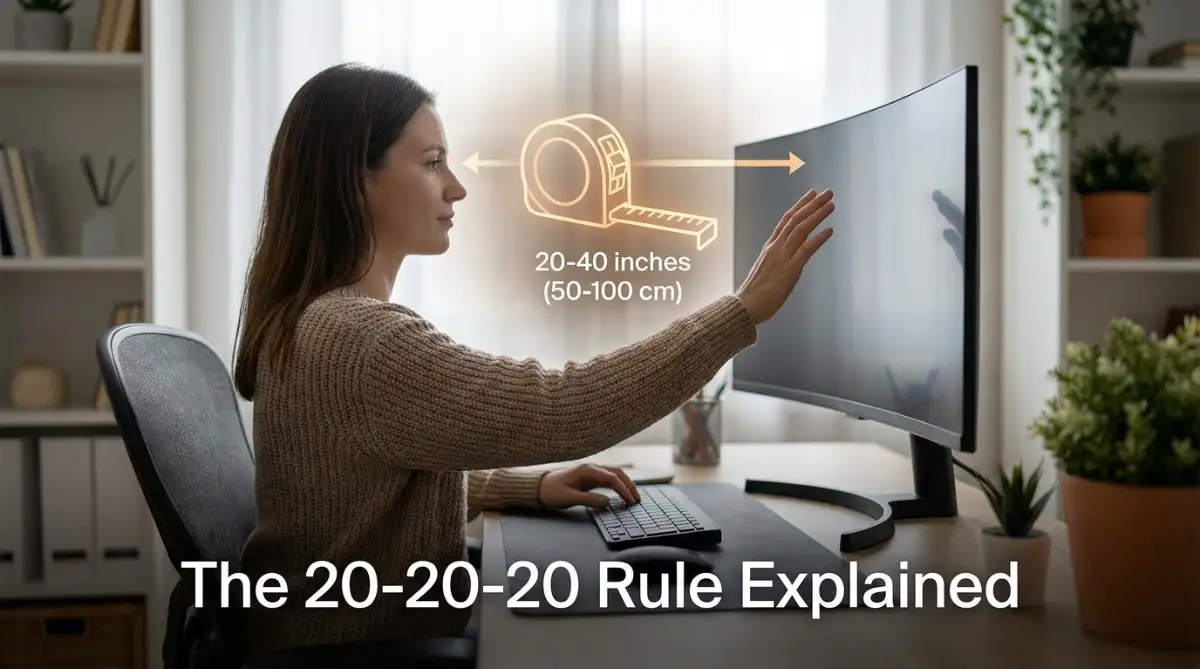
Most professionals place their computer screens way too close to their faces. This proximity forces the eyes to cross slightly inward, which demands massive muscular effort.
To find the perfect distance, sit back in your chair and extend your arm straight out in front of you. The very tip of your middle finger should just barely touch the screen.
Additionally, your screen should never be placed higher than your natural eye level. Your gaze should fall slightly downward, about 15 to 20 degrees below your straight-ahead vision.
This specific downward angle naturally covers more of your eyeball with your upper eyelid. By exposing less surface area to the open air, you immediately prevent rapid moisture evaporation.
Defeating the Invisible Enemy of Screen Glare
Glare is basically harsh, reflected light that bounces off your monitor directly into your sensitive pupils. Your eyes have to fight straight through this bright glare just to read your emails.
Never sit with an uncovered, bright window directly behind your computer monitor. The massive contrast between the bright outdoor sun and the darker screen will quickly exhaust your vision.
If possible, position your desk so that windows are entirely on your left or right side. If you absolutely cannot move your desk, simply ask your office manager for an anti-glare screen protector.
Natural Therapy and Biological Resets
Our bodies are designed to look at a variety of distances, not just a flat screen two feet away. Giving your visual system regular, structured breaks is the absolute best medicine for eye strain.
The Science Behind the 20-20-20 Habit
You have probably heard of this rule before, but very few people actually practice it correctly. The rule states that every 20 minutes, you need to look at an object at least 20 feet away for exactly 20 seconds.
Why exactly 20 seconds? Because that is the exact amount of biological time it takes for your internal eye muscles to completely relax and reset.
Pro Tip for Office Workers:
Do not rely on your memory to take these breaks. Set a gentle, vibrating alarm on your smartwatch or phone. When it goes off, simply look out the office window or stare down the longest hallway in your building.
The Warm Palming Technique for Instant Relief
When your eyes feel incredibly heavy and tired, try the palming method right at your desk. Rub your hands together rapidly for ten seconds until your palms feel very warm through friction.
Close your eyes gently and cup your warm hands entirely over them. Be very careful not to apply any direct physical pressure to the actual eyeballs.
Breathe deeply in this complete darkness for one full minute. The gentle warmth drastically increases blood circulation to the eye area, providing instant, highly soothing relief from screen fatigue.
Managing Artificial Light and Digital Settings
There is a massive industry built around selling products for digital eye strain. However, you can achieve amazing results simply by adjusting the tools you already have.
Myth vs Reality:
- The Myth: You must buy incredibly expensive blue-light-blocking glasses to protect your eyes from permanent blindness.
- The Reality: Leading ophthalmologists state that digital eye strain is mostly caused by decreased blinking and intense near-focusing. Adjusting your habits and screen settings is often much more effective than buying special glasses.
Tweaking Your Display Settings for Comfort
Instead of buying new products, simply adjust the device sitting in front of you. Start by actively turning down the overall brightness of your computer monitor.
Your screen should never look like a glowing lightbulb sitting in a dark room. The brightness of your display should blend in completely with the surrounding ambient light of your office.
Next, increase the default text size on your computer by just 10 or 15 percent. This tiny, effortless adjustment stops you from leaning forward and squinting.
When you stop squinting, you immediately relieve the deep muscular tension in your forehead and neck.
The "Tear Matrix" and Internal Hydration Secrets
We frequently forget that our internal bodily hydration directly affects our external eye moisture. If your entire body is dehydrated, your tear glands simply cannot produce high-quality, lasting tears.
Keep a large, reusable bottle of water clearly visible on your desk. Take small sips constantly throughout your morning and afternoon.
This clever habit also forces you to take natural micro-breaks from the screen every single time you reach for the bottle. If your office uses heavy, cold air conditioning, the air around you is likely incredibly dry.
Using a small, personal USB desktop humidifier can work absolute wonders. It continuously adds gentle moisture back into your personal breathing space, keeping your eyes perfectly comfortable all day long.
Master-Level Strategies for All-Day Screen Comfort
Most standard office monitors are set to a refresh rate of 60Hz straight out of the box. This means the image on your screen is redrawing itself exactly sixty times every single second.
While your conscious brain cannot see this rapid movement, your sensitive eye muscles absolutely feel it. This invisible, constant micro-flickering forces your eyes to work incredibly hard just to keep the text stabilized.
If your computer hardware allows it, go into your display settings and increase the refresh rate to 75Hz or even 120Hz. A higher refresh rate creates a buttery-smooth image that dramatically reduces the physical workload on your visual system.
The Science of Color Temperature
We also need to talk about the actual color of the light hitting your face. Digital screens naturally emit a very cool, blue-toned light that mimics high noon on a sunny day.
This is perfectly fine at 10:00 AM when you are answering morning emails and drinking coffee. But as the afternoon rolls around, this harsh blue light becomes incredibly abrasive to your tired eyes.
You should actively use built-in software features like "Night Light" on Windows or "True Tone" on Apple devices. These clever settings automatically shift your screen colors toward the warmer, orange end of the spectrum as the day progresses.
This warm light is incredibly soothing and feels completely natural to your biological system. According to the American Optometric Association, managing the harshness of screen glare and color temperature is an essential step in preventing long-term digital eye strain.
Nutritional Defense for Your Tear Film
Believe it or not, your diet plays a massive role in how your eyes handle digital stress. Your natural tears are not just made of water; they have a very specific top layer made entirely of specialized oils.
When you do not have enough healthy fats in your diet, this delicate oil layer becomes very thin and weak. Without a strong oil barrier, your tears will literally evaporate into the air within seconds of blinking.
This is exactly why your eyes feel like they are coated in rough sandpaper by 4:00 PM. You can easily fix this from the inside out by eating foods rich in Omega-3 fatty acids, like fresh salmon, chia seeds, and walnuts.
These healthy fats act like premium motor oil for your tear glands, keeping your eyes heavily lubricated even during long staring sessions. Clinical research published by the National Institutes of Health confirms that a steady intake of dietary Omega-3s can significantly improve dry eye symptoms over time.
Real-Life Scenarios: When Focus Steals Your Blinks
When you are doing deep, heavily focused work, you rarely notice the hours slipping away. For example, if you are a dedicated developer focused on building a private AI brain to safely train models on your data, you might stare at dark terminal screens for six uninterrupted hours.
This kind of intense, uninterrupted focus literally paralyzes your natural blink reflex. Your brain completely forgets to tell your eyelids to close because it is too busy processing complex information.
To survive these heavy work sessions, you must rely on external reminders rather than your own memory. Set a repeating soft chime on your computer that gently rings every thirty minutes.
Whenever you hear that specific sound, close your eyes as tight as you can for three full seconds. This simple squeezing action forcefully pumps fresh, oily tears out of your glands and washes them over your dry corneas.

The Silent Traps Wrecking Your Vision
Even when people try their best to protect their eyes, they often fall into very common, sneaky traps. These subtle mistakes can actually make your physical discomfort much worse over time.
Let us break down the everyday habits that are secretly sabotaging your eye health.
The Dark Mode Illusion
Almost everyone believes that switching their phone and computer to "Dark Mode" is the ultimate solution for screen fatigue. In reality, dark mode can actually cause massive problems depending on your physical environment and your specific eyesight.
When you read bright white text against a pitch-black background, your pupils naturally dilate to let in more light. When your pupils are wide open, the white text can begin to visually bleed into the dark background.
This creates a fuzzy glowing ring around the letters, which eye doctors call the halation effect. If you have even a mild case of astigmatism, this blurry glowing effect will force you to squint aggressively just to read a simple text message.
If you love dark mode, only use it in a dimly lit room where your pupils are already adjusted to the shadows. In a brightly lit office space, a light gray background with dark gray text is actually the most relaxing combination for your eye muscles.
The Late-Night Panic Scrolling
Sometimes, stressful life events keep us glued to our screens late into the night. If you find yourself awake at 2:00 AM desperately researching how to secure fast unsecured bank loans for immediate cash, you are likely scrolling in total darkness.
This extreme contrast between a brilliantly glowing phone screen and a pitch-black bedroom forces your eye muscles into extreme overdrive. It is exactly like staring directly into a bright flashlight while sitting in a dark closet.
Your visual system simply cannot handle that level of harsh contrast for long periods. If you absolutely must use your phone in bed, turn on your bedside lamp to create a gentle bridge of light between the screen and the dark room.
Relying on Gimmicky Solutions
Another massive mistake is spending huge amounts of money on "blue light blocking glasses" while ignoring basic ergonomics. Many office workers think these glasses act as an invisible magic shield against all screen damage.
They will wear the glasses but continue to sit two inches away from the monitor with terrible posture. The truth is, no pair of glasses in the world can save you if your screen is too close and you never blink.
According to experts at Harvard Medical School, much of the discomfort we feel is simply due to decreased blinking and extreme muscular strain, not just blue light exposure. Do not use accessories as an excuse to maintain terrible daily desk habits.
The Direct Airflow Disaster
Take a quick look around your immediate desk area right now. Is there a ceiling fan, a space heater, or an air conditioning vent blowing directly onto your face?
Constant, moving air is the absolute worst enemy of healthy, hydrated eyes. Even a very gentle breeze from a small desk fan will rapidly blow away your protective tear film before you even have a chance to blink.
Think of it like leaving a wet paper towel in front of a blowing fan; it will dry out and turn stiff in minutes. Reposition your desk fan so it blows toward your chest or your back, but never directly across your face.
Your Ultimate Eye Protection Blueprint
We spend so much time carefully planning our financial and professional futures. You might spend months reading articles on how to purchase your dream house with zero money down to secure your family's future.
Yet, we often spend absolutely zero minutes planning how to protect the very eyes that allow us to research those amazing strategies. Protecting your vision is not a one-time fix; it is a daily lifestyle commitment.
You do not need to implement every single tip we discussed all at once. Start by picking just one or two small adjustments to try during your next work shift.
A Simple Routine for Tomorrow
When you sit down at your desk tomorrow morning, immediately push your monitor back until it is roughly an arm's length away. Turn down the harsh brightness so it perfectly matches the ambient light of your office.
Fill up a large water bottle and place it right next to your keyboard as a visual reminder to stay hydrated. Write the word "Blink" on a sticky note and place it right on the bottom corner of your display frame.
Every time you take a sip of water, make a conscious effort to look completely away from the screen for twenty seconds. Look out the nearest window, admire a plant on your desk, or simply close your eyes and breathe deeply.
The Power of Small Adjustments
These tiny, almost effortless micro-breaks will compound throughout your workday. By the time 4:00 PM rolls around, you will suddenly realize that the familiar dull ache behind your eyes is completely gone.
You will actually have the physical energy to enjoy your evening, spend time with your family, and engage in your favorite hobbies. Your digital screens are incredible tools that connect you to the entire world, but they should never demand your physical health in return.
Take absolute control of your workspace today, respect your natural biological limits, and give your hardworking eyes the daily rest they truly deserve. You will immediately notice a massive boost in your daily mood, your overall focus, and your general wellbeing.
Medical Disclaimer: The information provided in this article is for educational and informational purposes only. It is not intended to be a substitute for professional medical advice, diagnosis, or treatment. Always seek the direct advice of your optometrist, ophthalmologist, or other qualified health provider with any specific questions you may have regarding a medical condition or severe eye pain. Never disregard professional medical advice or delay in seeking it because of something you have read on this website.