The Silent Nightmare Inside Your Inbox
A few years ago, I almost lost my entire bank account simply because I used my main email to sign up for a fun personality quiz online. I just clicked "allow" without reading the popup, and within weeks, my inbox was flooded with password reset emails from a stranger trying to steal my identity. That terrifying weekend taught me a hard lesson: clicking the easy login button is often the most dangerous thing you can do on the internet.
You think it is just a glitch. So, you go to your email to reset the password, only to find that you cannot access your inbox either.
Panic starts to set in. Your email is the master key to your entire digital life. It holds your banking alerts, private work conversations, family photos, and online shopping receipts.
Suddenly, you feel completely exposed. The worst part? You did not get hacked by some mastermind criminal in a dark room.
Instead, you accidentally left the front door wide open. You did this by clicking a simple, friendly-looking button that said, "Sign in with your email."
We all do it. We are in a hurry to use a new photo editing app or a free PDF converter. So, we grant these third-party tools full permission to connect with our email accounts.
We blindly click "Accept" without reading the fine print. We assume these big tech companies have strict safety measures in place to protect us. But the reality is much darker. When you give a random application permission to read your profile, you are often giving them the power to read your private messages.
This simple mistake is causing millions of people to face identity theft, endless spam, and severe anxiety. The mental toll of losing your digital identity is heavy.
People spend months fighting with customer support, trying to prove who they are. They lose sleep worrying about what private conversations are being read by strangers.
It is a completely overwhelming experience. Today, I want to show you exactly how this happens and how we can stop it together.
The Mechanics of a Digital Betrayal
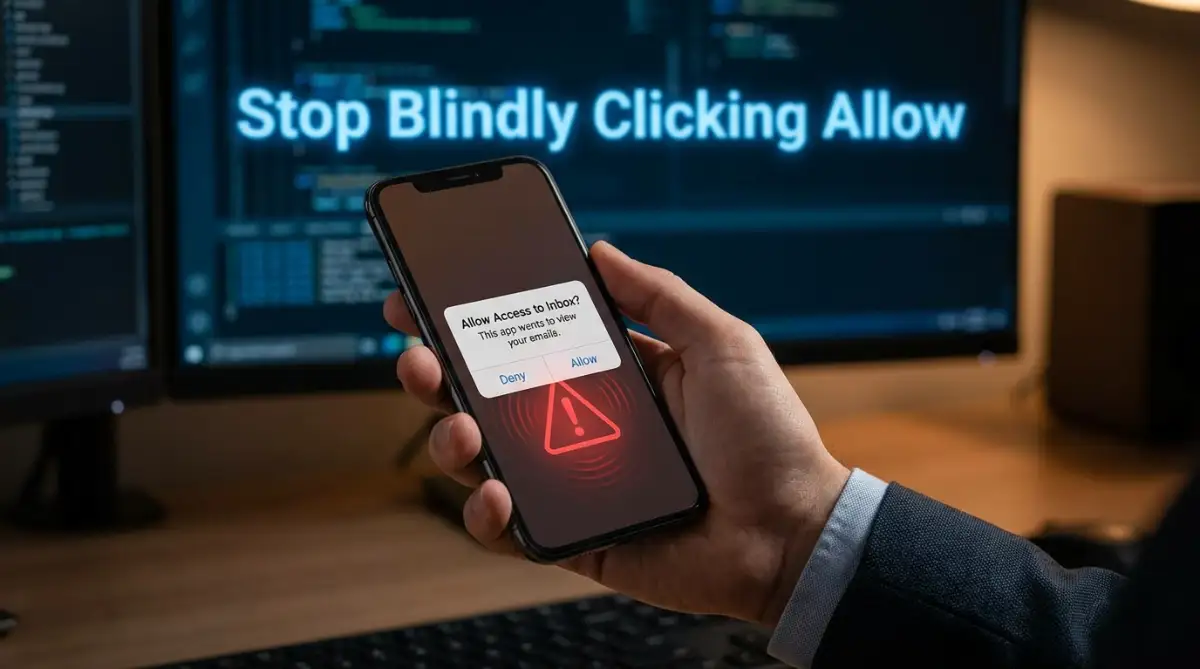
To fix this problem, we need to understand how the system actually works behind the scenes. When you click that "Allow" button, you are using a technology called OAuth.
OAuth is designed to make logging in easier. Instead of creating a new password for every single website, you let your main email provider verify your identity.
On the surface, this sounds amazing. It saves time and stops you from forgetting passwords.
But here is where the danger lies. OAuth uses digital "tokens" to grant access. Think of a token as a spare key to your house.
When you give an app this digital token, they no longer need your password. They can walk right into your account whenever they want, long after you stop using their service.
What You See vs. What They Get
When a popup asks for permission, the language is often very tricky. It might say, "Allow this app to view your basic profile info."
But if you click the tiny drop-down arrow, you might see a terrifying detail. It might actually say, "Read, send, and permanently delete all your emails."
Myth vs. Reality: App Permissions
- The Myth: If I delete the app from my phone, they lose access to my data.
- The Reality: Deleting the app does absolutely nothing. The company still holds the digital token and can access your inbox through their servers.
- The Myth: Only well-known companies ask for these permissions.
- The Reality: Anyone can create a simple web tool and request full inbox access.
This means a completely random developer sitting halfway across the world could be scanning your private messages. They do not do this manually, of course.
They use automated software to scan your inbox for valuable information. They look for purchase receipts, bank statements, and personal contacts.
The Hidden Data Broker Economy
You might wonder why a free game or a simple calculator app needs to read your emails. The answer is simple: your personal data is highly profitable.
There is a massive, hidden economy of data brokers. These companies collect bits of information about you from thousands of different sources.
When an app scans your inbox, they find out what you buy, where you travel, and what medications you take. They package this private information into a neat little file.
Then, they sell it to the highest bidder. This is why you suddenly start getting highly specific scam emails or annoying marketing calls.
Pro Tip for Digital Safety:
Always assume that a "free" service is making money by selling your data. If you are not paying for the product, you are the product.
Real-Life Scenarios: When "Convenience" Turns Dangerous
Let us look at how this plays out in the real world. I want to share a few common scenarios that catch people off guard every single day.
By understanding these traps, you can train your brain to spot danger before it happens.
Scenario 1: The "Helpful" Calendar Organizer
Imagine you find an amazing new app that promises to organize your messy schedule. It asks to connect directly to your email so it can automatically add flight times and meeting invites.
You think this is brilliant. You click allow. For a few weeks, the app works perfectly.
Then, something strange happens. Your friends start complaining that they are receiving weird links from your email address.
What actually happened? The calendar app was sold to a shady company.
Because you gave them a token to "Send emails on your behalf," they used your trusted name to send out malicious links. Your friends clicked the links because they trusted you.
Now, your entire contact list is compromised. This chain reaction is exactly how massive security breaches spread so quickly.
Scenario 2: The Unsubscribe Service Trap
Here is a very ironic situation. Many people get tired of receiving too much junk mail.
So, they search for a service that promises to "Unsubscribe you from spam automatically." To do this, the service demands full access to read your entire inbox.
You give them the keys, hoping for a clean inbox. Instead, this service actively scans your private purchase history.
They take all your shopping data and sell it to marketing firms. You might get slightly less spam from some places, but your deepest private habits are now public knowledge in the data broker world.
You tried to solve a privacy problem, but you accidentally created a much larger one.
Taking Back Control: Your Personal Security Audit
Now that we know the hidden dangers, it is time to take action. You do not need to be a computer genius to secure your digital life.
You just need to follow a few straightforward habits. Let us walk through a complete digital cleanup.
If you feel completely overwhelmed by your account settings, watch this quick video below where a tech expert shows you exactly how to kick unwanted apps out of your email. Once you finish watching, keep reading to discover how to create a fake digital shield for your future sign-ups!
Performing a 60-Second Access Review
The very first thing you need to do is see who currently has keys to your house. You might be shocked at how many old apps still have a connection to your main account.
My biggest mistake was assuming that deleting a useless app from my phone automatically locked them out of my data. I finally checked my email security settings last month and found out a random fitness tracker from five years ago still had full permission to read my private messages! Now, I make it a strict rule to use a totally fake "burner" email address for any new app I want to test out.
If you use a major email provider, they all have a security dashboard. You need to log in and find the section labeled "Connected Apps" or "Third-Party Access."
When you open this list, you will likely see apps you haven't used in five or six years. You might see old dating apps, forgotten fitness trackers, or random web games.
Your mission right now is simple. Revoke access to every single application that you do not actively use on a daily basis.
Do not hesitate. If you need the app again in the future, you can always reconnect it later.
Reading the Fine Print Like a Detective
Moving forward, we need to change how we interact with permission screens. We need to stop treating the "Accept" button like a simple speed bump.
Next time an app asks to connect to your account, stop and read exactly what they are asking for.
- Do they just want to see your email address? That is usually okay.
- Do they want to manage your contacts? Think twice.
- Do they want permission to read, compose, and send messages? Stop immediately and walk away.
Quick Comparison Table: Safe vs. Unsafe Requests
What The App Asks For Danger Level What You Should Do View your basic profile info Low Accept if you trust the brand. View your calendar events Medium Only accept for trusted calendar tools. Read, compose, and send emails EXTREME Reject immediately. Find an alternative. Manage your contacts High Usually unnecessary. Reject if possible.
There is almost no valid reason for a third-party tool to need full reading rights to your private messages. If a tool demands this, you should find a safer alternative.
Creating Disposable Digital Shields
If you love trying out new software, you need a safe way to do it. You should never use your primary email for testing random web apps.
Your primary email should be heavily guarded. It should only be used for banking, government services, and highly trusted platforms.
For everything else, you should create a "burner" or alias email account. This is a secondary address that does not contain any of your real personal data.
When a random app asks to connect, you give them the burner account. If that account gets compromised, scanned, or filled with spam, you will not care.
You can simply delete the burner account and move on with your life. Your main digital identity remains completely untouched and safe.
The Final Layer of Defense
Taking away permissions is a massive step in the right direction. But you also need to make sure your main door is locked tight.
Always turn on two-step verification for your primary inbox. This means that even if someone manages to steal your password, they cannot get in without your physical phone.
Digital safety is not about living in fear. It is simply about being aware of your surroundings.
By taking these small, practical steps today, you are actively protecting your peace of mind. You are ensuring that your private life remains exactly that—private.
Beyond the Basics: Building an Unbreakable Inbox Fortress
Now that we understand how easily our data can be compromised, it is time to upgrade our defenses. Basic security habits are a great starting point, but they are simply not enough to stop modern data brokers.
You need to adopt a proactive mindset to protect your digital identity. Think of your inbox as the main vault of a bank.
You would never leave the vault door wide open just because you trust the security guard on duty. The same logic applies to your email account and the third-party tools you use every day.
Let us look at some highly effective, advanced strategies that cybersecurity experts use to stay completely hidden. These methods are surprisingly easy to set up once you know how they work.
Mastering the Art of Email Aliasing
One of the smartest moves you can make is to stop handing out your real email address. Every time you type your main address into a random website, you are taking an unnecessary risk.
Instead, you should start using an email alias service. Tools like Apple's Hide My Email or DuckDuckGo Email Protection act as digital middlemen.
When a new app asks for your email, the alias service generates a random, fake address for you. This fake address automatically forwards any important messages straight to your real inbox.
The third-party app never actually learns your true identity. If that specific app gets hacked or starts selling your data, you simply delete that single fake address.
Why This Works Perfectly:
- Your real inbox stays completely hidden from data brokers.
- You instantly know which company sold your data if spam arrives at a specific alias.
- You can cut off communication with a single click without affecting your main accounts.
Embracing a "Zero Trust" Personal Policy
In the corporate world, there is a famous security model called Zero Trust. This simply means that a system should never trust anything by default, even if it has been verified before.
You should apply this exact same philosophy to your personal devices. Never assume an app is safe just because it has a friendly logo or good reviews.
Always deny access first, and only grant the absolute minimum permissions required for the app to function. If a simple photo editor demands access to your contact list, delete the app immediately.
For a deeper understanding of how these safety frameworks operate on a larger scale, you can explore the official guidance on identity protection provided by national security agencies. Applying these high-level principles to your home network changes the game completely.
Shifting to Local Software Solutions
A major reason we give apps access to our email is for cloud-based convenience. We want a web tool to quickly summarize our long PDF documents or organize our messy receipts.
However, sending your personal files to an unknown cloud server is a massive privacy gamble. The smartest alternative is to perform these tasks locally on your own computer.
Instead of granting a random website permission to scan your inbox, download software that runs offline. This keeps your sensitive files completely isolated from the open internet.
This approach is highly similar to modern data privacy techniques used by developers. For instance, many professionals are now learning how to safely train models on your private data locally, rather than handing sensitive information over to public AI platforms.
Keeping your processing local ensures that you retain full ownership of your digital footprint.
The Silent Traps: Where Smart Users Make Costly Errors
Even with great security tools, human psychology often becomes our biggest weakness. Data brokers design their permission screens to take advantage of our impatience.
They know that when you are in a rush, you are far more likely to make a mistake. Let us examine the most common traps that catch smart people off guard.
Understanding these psychological tricks will help you spot them before you click the wrong button.
The "Convenience Reflex" Trap
We live in a world where speed is everything. When you are trying to buy a concert ticket before it sells out, a five-second delay feels like a lifetime.
During these high-pressure moments, a popup appears asking to "Sign in with your Email." Your brain immediately sees this as the fastest route to your goal.
This is the convenience reflex, and it is incredibly dangerous. You bypass the secure password creation process just to save a few seconds.
By giving into this reflex, you might accidentally hand over full reading rights to your private inbox. Always pause for three seconds and read the fine print before clicking accept.
The Illusion of Trusted Marketplaces
Another massive mistake is assuming that an app is safe just because it is available in an official app store. People blindly trust these platforms to filter out malicious software.
While major app stores do have security checks, their main focus is blocking physical viruses. They are remarkably bad at preventing aggressive data collection.
Many apps start out as legitimate, helpful tools to gain your trust and your permission tokens. Later on, the original developer might sell the app to a shady advertising company.
The new owners can quietly change the rules in the background. If you want to see how frequently these companies manipulate rules, consumer advocacy groups regularly document the fight against corporate data privacy violations and deceptive software updates.
This is exactly why you must regularly review and revoke app permissions, even for tools you downloaded years ago.
Connecting Financial Trackers to Primary Inboxes
Perhaps the most devastating mistake people make is connecting automated financial apps directly to their primary email. Budgeting tools often ask to scan your inbox to find digital purchase receipts.
They promise to categorize your spending automatically, which sounds incredibly helpful. However, your inbox also contains password reset links for your bank accounts.
If that budgeting app is compromised, an attacker gains a direct roadmap to your entire financial life. They can see exactly where you bank and how much you spend.
This invisible threat is very similar to how people ignore understanding unseen market risks when investing blindly. You are exposing your most valuable assets without realizing the underlying danger.
If your identity is stolen through an email breach, attackers can drain your savings in a matter of hours. Victims of these attacks often find themselves in desperate situations, suddenly needing to figure out how to secure immediate emergency funding just to pay their rent.
Never mix your financial tracking tools with the email account that holds your password recovery keys. Always keep them strictly separated.
Your Action Plan for a Stress-Free Digital Identity
Taking control of your online security might feel overwhelming at first, but it is incredibly rewarding. You do not have to fix everything in a single day.
Digital privacy is about making small, consistent improvements over time. By changing a few simple habits, you can drastically reduce your risk of falling victim to identity theft or invasive data tracking.
Every time you deny an unnecessary app permission, you are actively taking your power back. You are making it significantly harder for companies to profit off your personal life.
A Quick Weekend Security Checklist
To make this process as easy as possible, I have put together a short checklist. Grab a cup of coffee this weekend and spend fifteen minutes going through these steps.
Your Next Steps:
- Open your main email settings: Locate the "Security" or "Connected Apps" tab.
- Start a ruthless cleanup: Remove access for any app you have not actively used in the last 30 days.
- Create a junk email address: Set up a free, secondary account right now to use for future app testing.
- Review your financial links: Disconnect any budgeting or receipt-scanning tools from your main inbox.
By completing these four simple tasks, you will instantly eliminate the majority of your hidden security risks. You will finally have the peace of mind knowing that your private messages are actually private.
Stay curious, stay cautious, and always remember that your personal data is yours alone to control. Do not let anyone tell you that sacrificing your privacy is the only way to enjoy modern technology.
Cleaning up my email permissions felt like a huge weight lifted off my shoulders, and I promise you will feel that exact same relief. You have the total power to lock your digital front door and take your privacy back right now. Grab your phone, take ten minutes to remove those old apps today, and sleep much better tonight knowing your personal life is actually safe.
Disclaimer: The information provided in this article is for educational and informational purposes only. Cybersecurity threats evolve constantly, and no method offers 100% protection against data breaches. Always consult with a certified IT security professional for personalized advice regarding your specific network and account setups.